


Get your data estate in order.
Every pipeline, table and dashboard mapped, with the data the business depends on put first.
We deploy Dataring in your own cloud. It reads metadata and access logs, never rows or query text, and changes nothing until your team approves.

All data pipelines are treated as equal. But, some pipelines are more equal than others.
The pipeline behind the CFO’s dashboard or the quarterly filing should be priority, resilient and on time. The one behind a table nobody has opened in months should not run every hour. Most data platforms treat both exactly the same. Three ways that shows up.
Organize the estate and control what it costs.
Deployed in your cloud, connected to your tools
Metadata and access logs only.
Dataring runs inside your cloud account and connects through plugins for the tools already in place. Row data and query text remain in your account, and every change passes through approvals your team controls.
See all integrations
A complete map of the data estate
Connect each tool once. Dataring maps the rest.
Dataring maps every source, pipeline, table and dashboard, with lineage from end to end and a record of who reads each asset. Where a catalog already exists, Dataring builds on its contents and fills in what is missing. Agents draft descriptions, tags and owners from how the data is used, and Dataring writes them to your catalog after your team approves.

Spend on what matters
Pipelines, monitoring and refresh schedules set by how the business uses data.
Dataring measures importance by who uses each dataset, including whether it feeds a regulatory or external report. Pipelines behind critical data receive deeper monitoring, alerts routed to the right people and priority in the scheduler. Unused pipelines are retired within limits your team sets, and refresh schedules follow demand as it rises and falls.
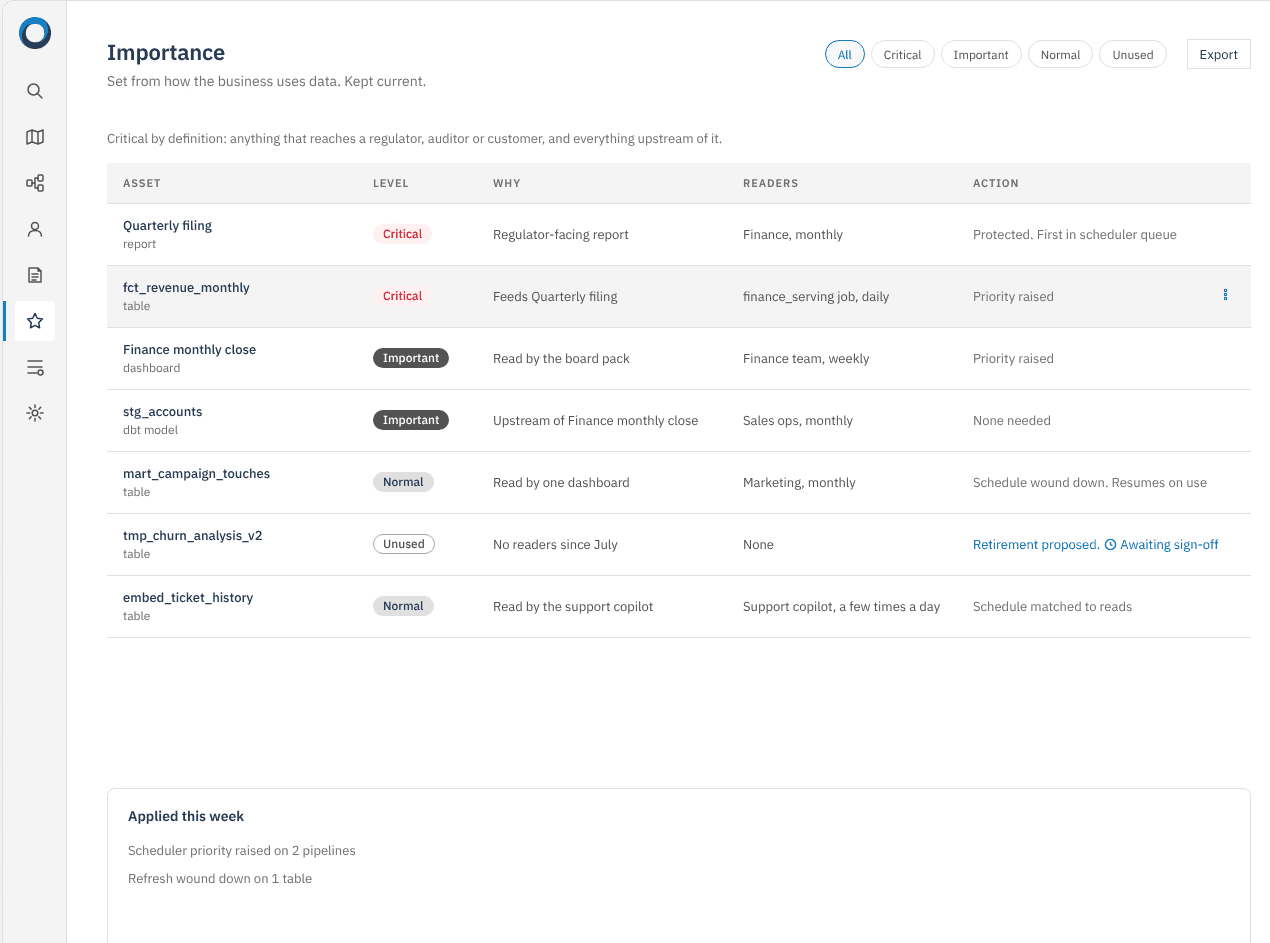
Dataring closes the gap between measuring what matters and doing something about it.
Hard to see what’s there
- Pipelines with no clear purpose, feeding tables with no known readers.
- Descriptions, tags and owners filled in by hand when someone finds the time.
- Board reports and scratch tables get the same monitoring, retries and refresh schedule.
- Refreshes run on a fixed timer, whether or not anyone needs the data.
- Critical data gets tagged by hand, usually once a year.
Dataring connects to the stack you already run.
Nothing is migrated and no tool is replaced. We connect once to each tool in place, and Dataring maps how data moves between them.
BI
Pipelines and sync
Storage


Connect once. Dataring does the rest.
1
Connect your stack
Give Dataring read-only access to warehouse access logs, plus your catalog if you use one. It takes one engineer about two hours.
2
See what matters
Dataring maps the estate, fills in missing descriptions, tags and owners, and shows which data the business relies on.
3
Approve the changes
Agents suggest changes and explain each one. Dataring applies the ones your team approves and keeps a log.
Try Dataring on your own data for 30 days.
It runs in your cloud and maps your entire estate. By the end, you’ll see an organized data estate with resilient data infrastructure.